Find these elements in Library › Motion › Elements, section Text emphasis. Click a tile to add it at the playhead, or drag it onto the timeline. Select the item on the timeline to change its options in the Inspector. Most of these elements work on marked phrases: wrap a phrase in *…* in the text, and each marked phrase gets its effect one by one, at its own cue. The hand-drawn marks have a Roughness and a Seed to change the wobble.

Highlighter
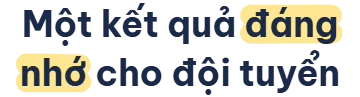
Highlighter element
Text whose marked phrases get a translucent marker swept behind them, one by one. Key options in the Inspector:
  • Text: The text; wrap phrases in *…* to mark them (\* for a literal star).
  • Mark style: Fill = marker over the words, underline = one band under the words.
  • Mark opacity: Marker opacity (0.6 when not set).
When to use: Point out the key words of a quote or a definition.

Circled words

Circled words element
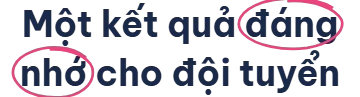
Text whose marked phrases get a hand-drawn loop drawn around them, one by one. Key options in the Inspector:
  • Text: The text; wrap phrases in *…* to mark them (\* for a literal star).
  • Thickness: Stroke width in px.
  • Roughness: 0 = clean strokes, 1 = very hand-drawn.
When to use: Draw attention to one word or number on screen.

Strike-through

Strike-through element
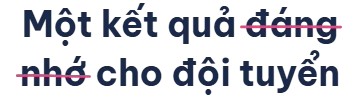
Text whose marked phrases get struck through by a hand-drawn line, one by one. Key options in the Inspector:
  • Text: The text; wrap phrases in *…* to mark them (\* for a literal star).
  • Thickness: Stroke width in px.
  • Roughness: 0 = clean strokes, 1 = very hand-drawn.
When to use: Correct a myth, or show a price or claim being replaced.

Crossed off

Crossed off element
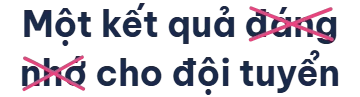
Text whose marked phrases get crossed off with a hand-drawn X, one by one. Key options in the Inspector:
  • Text: The text; wrap phrases in *…* to mark them (\* for a literal star).
  • Thickness: Stroke width in px.
  • Roughness: 0 = clean strokes, 1 = very hand-drawn.
When to use: Rule out wrong options or bad habits.

Article highlight

Article highlight element
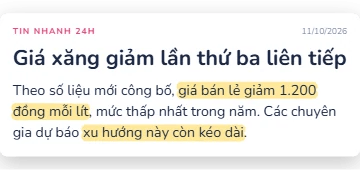
A news article card rises in, and the marked phrases of its text get highlighted one by one. Key options in the Inspector:
  • Source: Publication name above the headline.
  • Date: Date next to the source; leave it empty for none.
  • Body: Article text; *…* phrases get highlighted one by one.
When to use: Quote a news story or a source on screen.

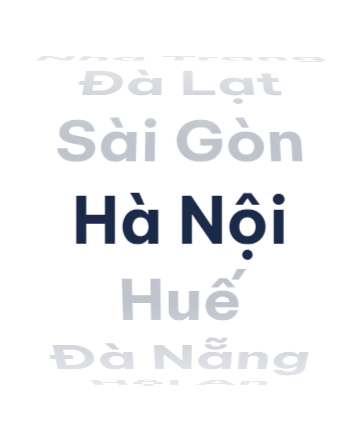
Text wheel

Text wheel element
Rows of words on a turning wheel that spins and lands on one row, dimming the others. Key options in the Inspector:
  • Items: One row per line (up to 12 rows of 40 characters).
  • Land on: Row the wheel stops on (1 = first).
  • Turns: Full turns before landing.
When to use: Reveal a pick from a list: a winner, a topic, a random choice.